# Attention Is a Zoom

Source: https://subtext.fullstory.com.pgm.c5nprx.cc/blog/attention-is-a-zoom
Published: 2026-07-24
Author: Joel Webber and Clint Ayres
Topic: research

Every question you ask a session collapses to the same handful of moves: map, then zoom.

_A calculus of session review._

A good session replay holds the user's trajectory: every click, navigation, network request, and console log. But dumping all of it into an agent's context window puts stress on attention. What's the important signal? Is repeated data meaningful? Are these errors impacting the user experience or just noise? Agents are great at summarizing data sets, but not at deciding what to summarize.

Session review needs a calculus: a pattern of progressive disclosure for revealing what happened. Every question an agent asks reduces to two moves: map the experience, then zoom into the details. Since each question maps to a specific set of tools, any query becomes a formula the agent can reuse.

## Two data sets to review

A session review happens over two data sets: a signal stream and visual snapshots.

A **signal stream** is everything that happened, in order and when: the user's interactions, the navigations between pages, the network requests, and the browser console. Anything that failed is also flagged as an error.

A **snapshot** is the pixels at any instant, plus a text snapshot of the on-screen elements.

An agent reviews across both data sets: it zooms through the signal stream, or views snapshots and pixels at specific moments. We use _zoom_ for the motion of attention: zoom in for more detail, zoom out for context. Every zoom call costs tokens, so the agent budgets attention by controlling how much resolution is returned.

Let's open the session and follow the agent's moves.

_Interactive: click to explore each figure below._

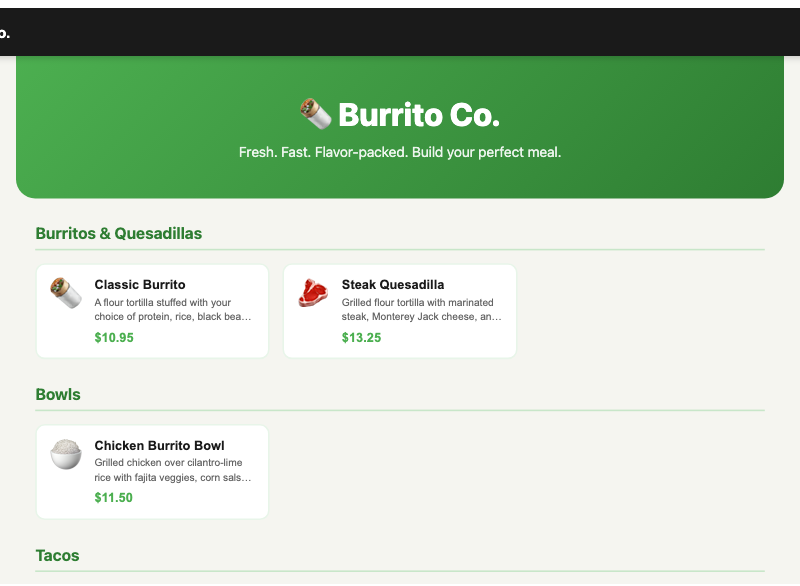
<div data-widget="lens-snapshot" data-figure="menu">
<figure class="snap-pair">
  <div class="snap-pair__shot">
    <img src="/blog/images/attention-is-a-zoom/burrito-menu.png" alt="The Burrito Co. menu, where the session begins" />
  </div>
  <div class="snap-pair__tree"><code>[main] .burrito-main
  [heading]   "🌯 Burrito Co."
  [paragraph] "Fresh. Fast. Flavor-packed."
  [heading]   "Burritos & Quesadillas"
  [button]    "🌯 Classic Burrito   $10.95"  .menu-card
  [button]    "🥩 Steak Quesadilla  $13.25"  .menu-card
  [heading]   "Bowls"
  [button]    "🍚 Chicken Burrito Bowl $11.50"  .menu-card
  [heading]   "Tacos"
  [button]    "🌮 Veggie Tacos  $9.75"  .menu-card</code></div>
  <figcaption>Where the session begins. Every snapshot is two halves: the pixels (left) and the text snapshot the agent reads (right).</figcaption>
</figure>
</div>

## The map: always the entry point

Before an agent can zoom anywhere in the signal stream to answer a question, it needs to orient itself to where the data is clustered. Opening the session hands the agent a map and a digest: the user's flow through the app, counts of everything captured, and the signals rolled up at each stop.

Open the session and this is what comes back:

```
## Map · 32 events · 0.0s–47s · 1 page(s)
flow: /apps/burrito/ ▸ /item/ ▸ /cart/ ▸ /apps/burrito/ ▸ /item/ ▸ /cart/ ▸ /checkout/ ▸ /confirmation/
phases:
  /apps/burrito/[2]
  -> /item/?id=classic-burrito[4]
  -> /cart/[2]
  -> /apps/burrito/[2]
  -> /item/?id=chips-guac[2]
  -> /cart/[2]
  -> /checkout/[16]
  -> /confirmation/[2]
kinds:
  navigation   8
  interaction 19
  network      3 (2 err)
  console      2 (2 err)
tags:
  error:4

# /apps/burrito/ (opened)
page-load ×1 · interaction ×1

# /item/?id=classic-burrito (navigated)
interaction ×3

# /cart/ (navigated)
interaction ×1

# /apps/burrito/ (navigated)
interaction ×1

# /item/?id=chips-guac (navigated)
interaction ×1

# /cart/ (navigated)
interaction ×1

# /checkout/ (navigated)
interaction ×11 · network ×2 (2 err) ("POST /api/checkout") · console ×2 (2 err)

# /confirmation/ (navigated)
network ×1 ("POST /api/checkout")

# /confirmation/ (closed)
```

The map orients the agent; the digest shows the signals cluster at checkout, where all four errors are.

## How to take a closer look

With the map in hand, the agent can request more data, in greater detail, at any point in the session.

Any signal can be shown to the agent at one of four grains, coarse to fine:

<figure class="grain-ladder" aria-label="The grain ladder, coarse to fine, with the map off the ladder">
  <div class="grain-ladder__map">
    <span class="grain-ladder__map-label">map</span>
    <span class="grain-ladder__map-desc">always returned · counts everything, matched or not · not a grain</span>
  </div>
  <ol class="grain-ladder__rungs">
    <li class="grain-ladder__rung">
      <span class="grain-ladder__name">digest</span>
      <span class="grain-ladder__what">one line per kind, like <code>network ×3 (2 err)</code></span>
      <span class="grain-ladder__cost">
        <span class="grain-ladder__bar" style="--w: 8%"></span>
        <span class="grain-ladder__cost-label">~60 tokens</span>
      </span>
    </li>
    <li class="grain-ladder__rung">
      <span class="grain-ladder__name">standard</span>
      <span class="grain-ladder__what">the readable transcript, benign repeats merged</span>
      <span class="grain-ladder__cost">
        <span class="grain-ladder__bar" style="--w: 61%"></span>
        <span class="grain-ladder__cost-label">~460 tokens</span>
      </span>
    </li>
    <li class="grain-ladder__rung">
      <span class="grain-ladder__name">machine</span>
      <span class="grain-ladder__what">every signal, nothing merged</span>
      <span class="grain-ladder__cost">
        <span class="grain-ladder__bar" style="--w: 70%"></span>
        <span class="grain-ladder__cost-label">~530 tokens</span>
      </span>
    </li>
    <li class="grain-ladder__rung">
      <span class="grain-ladder__name">detail</span>
      <span class="grain-ladder__what">every signal plus its payload: headers, bodies, stack traces</span>
      <span class="grain-ladder__cost">
        <span class="grain-ladder__bar" style="--w: 100%"></span>
        <span class="grain-ladder__cost-label">~760 tokens</span>
      </span>
    </li>
  </ol>
  <figcaption>Bar length is the token cost of reading the whole burrito session at that grain (est.). Pick the correct rung to progressively disclose more information.</figcaption>
</figure>

Visual snapshots have their own dial as well, a `lens`, that controls which elements come back in the text snapshot; this doesn't affect the pixels.

<figure class="grain-ladder" aria-label="The lens dial: which elements a snapshot returns, coarse to fine">
  <ol class="grain-ladder__rungs">
    <li class="grain-ladder__rung">
      <span class="grain-ladder__name">interactive</span>
      <span class="grain-ladder__what">only what you can act on: buttons, inputs, links (5 elements)</span>
      <span class="grain-ladder__cost">
        <span class="grain-ladder__bar" style="--w: 8%"></span>
        <span class="grain-ladder__cost-label">~30 tokens</span>
      </span>
    </li>
    <li class="grain-ladder__rung">
      <span class="grain-ladder__name">visible</span>
      <span class="grain-ladder__what">everything on screen (12 elements)</span>
      <span class="grain-ladder__cost">
        <span class="grain-ladder__bar" style="--w: 32%"></span>
        <span class="grain-ladder__cost-label">~120 tokens</span>
      </span>
    </li>
    <li class="grain-ladder__rung">
      <span class="grain-ladder__name">full</span>
      <span class="grain-ladder__what">every element, plus CSS selectors (15 elements)</span>
      <span class="grain-ladder__cost">
        <span class="grain-ladder__bar" style="--w: 100%"></span>
        <span class="grain-ladder__cost-label">~370 tokens</span>
      </span>
    </li>
  </ol>
  <figcaption>Bar length is the token cost of the text snapshot at each lens (est.). The pixels are identical; only the text snapshot changes.</figcaption>
</figure>

<div class="note">

Each snapshot in this post is shown with both the pixels and the text snapshot. The `lens` dial decides how much of that text snapshot comes back to manage tokens; the pixels never change.

</div>

## Naming what to look at

An agent asks for signals by naming which ones it wants and in how much detail. For example `{network: "machine"}` means every network signal, over a time period, with no rollups.

Names for signals can overlap. A failed request is both `network` and `error`, and when a signal matches two, the finer grain wins.

## Answering a question

Now put the calculus to work on a real report. The agent picks up a ticket: "A shopper says checkout is broken and they couldn't place their order." To find out why, it asks four questions: what did they do, what went wrong, what did they see, and what did the network do?

<div class="note">

Read `;` as **then**. Every answer has the same shape: $\mathrm{map}$ first, then a $\mathrm{zoom}$.

</div>

### What happened?

Where the user went and what they did.

$$\mathrm{map} \;;\; \mathrm{zoom}(\{\mathtt{navigation} \mapsto \mathtt{standard},\ \mathtt{interaction} \mapsto \mathtt{standard}\})$$

<div data-widget="resolution-slice" data-slice="what_happened">
<div class="attn-slice__out"><pre><code># /apps/burrito/ (opened)
3120ms  click "🌯 Classic Burrito"
6480ms  click "steak"
8210ms  click "guacamole (+$2)"
10360ms click "Add 1 to Cart"
13840ms click "Continue Shopping"
# … Chips & Guacamole added …
# /checkout/
25640ms click "Continue to Payment →"
28080ms change card "•••• 0000"
        click "Continue to Review →"  (×3)
        click "Place Order · $17.17"  (×3)
        click "Try Again"             (×2)
42880ms change card "•••• 4242"</code></pre></div>
</div>

This whole visit is readable to the agent as a story: the user browses, customizes, adds to cart, checks out, and a retry that hints something failed.

### What went wrong?

View just errors at the finest grain across the whole session.

$$\mathrm{map} \;;\; \mathrm{zoom}(\{\mathtt{error} \mapsto \mathtt{detail}\})$$

It lands on the two declines, full failing payload, nothing else:

<div data-widget="resolution-slice" data-slice="what_went_wrong">
<div class="attn-slice__out"><pre><code># /checkout/
33269ms POST /api/checkout => 402 (149ms)
    req-headers: content-type: application/json
    req:  { card_last_four: "0000", total: 17.17 }
    rsp-headers: content-type: application/json · content-length: 125
    rsp:  { error: "card_declined", code: "do_not_honor", card_last_four: "0000", message: "The card issuer declined the transaction." }
33270ms console.error "checkout declined: 402 do_not_honor"
38159ms POST /api/checkout => 402 (144ms)
    req-headers: content-type: application/json
    req:  { card_last_four: "0000", total: 17.17 }
    rsp-headers: content-type: application/json · content-length: 125
    rsp:  { error: "card_declined", code: "do_not_honor", card_last_four: "0000", message: "The card issuer declined the transaction." }
38160ms console.error "checkout declined: 402 do_not_honor"</code></pre></div>
</div>

The agent sees two failures out of thirty-two signals: the card was declined twice, same card both times.

### What did they see?

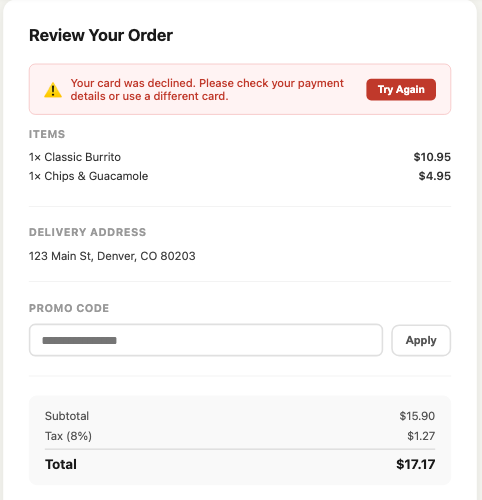
The stream says what happened; pair it with a snapshot at each moment and you also see what the shopper saw.

$$
\begin{aligned}
\mathrm{map} \;;\; \Big(\ &\mathrm{zoom}(\{\mathtt{navigation} \mapsto \mathtt{standard}, \\
&\qquad \mathtt{interaction} \mapsto \mathtt{standard}, \\
&\qquad \mathtt{error} \mapsto \mathtt{detail}\}), \\
&\{\mathrm{snapshot}(\mathrm{moment}_i)\}_{i=1}^{N}\ \Big)
\end{aligned}
$$

<div data-widget="lens-snapshot" data-figure="decline">
<figure class="snap-pair">
  <div class="snap-pair__shot">
    <img src="/blog/images/attention-is-a-zoom/burrito-decline.png" alt="The review step with the card-declined banner" />
  </div>
  <div class="snap-pair__tree"><code>[main] .burrito-main
  [heading]   "Review Your Order"
  [alert]     "⚠️ card declined…"  .error-banner
    [button]  "Try Again"  .retry-btn
  [heading]   "ITEMS"
  [text]      "1× Classic Burrito   $10.95"
  [text]      "1× Chips & Guacamole $4.95"
  [heading]   "DELIVERY ADDRESS"
  [paragraph] "123 Main St, Denver, CO"
  [heading]   "PROMO CODE"
  [textbox]   "•••• •••• •••• *"  .form-input
  [button]    "Apply"  .btn-secondary
  [text]      "Total   $17.17"
  [button]    "← Back"
  [button]    "Place Order"  .btn-primary</code></div>
  <figcaption>The review step, card declined: what the shopper saw, and the text snapshot the agent read.</figcaption>
</figure>
</div>

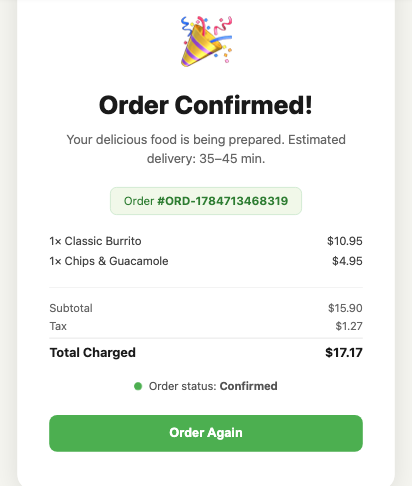
Next the user swaps in a good card and the order goes through.

<div data-widget="lens-snapshot" data-figure="confirmation">
<figure class="snap-pair">
  <div class="snap-pair__shot">
    <img src="/blog/images/attention-is-a-zoom/burrito-confirmation.png" alt="The order confirmed once a good card was used" />
  </div>
  <div class="snap-pair__tree"><code>[main] .burrito-main
  [heading]   "Order Confirmed!"
  [paragraph] "Your food is being prepared…"
  [text]      "Order #ORD-1784713468319"
  [text]      "1× Classic Burrito   $10.95"
  [text]      "1× Chips & Guacamole $4.95"
  [text]      "Total Charged   $17.17"
  [text]      "Order status: Confirmed"
  [button]    "Order Again"  .btn-primary</code></div>
  <figcaption>The order confirmed once a good card was used.</figcaption>
</figure>
</div>

### Devtools

The whole network and console picture across the session, one line per request and log.

$$\mathrm{map} \;;\; \mathrm{zoom}(\{\mathtt{network} \mapsto \mathtt{machine},\ \mathtt{console} \mapsto \mathtt{machine}\})$$

This is where the successful retry shows up alongside the two declines. Zoom any request to detail for its full headers and body.

<div data-widget="resolution-slice" data-slice="devtools">
<div class="attn-slice__out"><pre><code># /checkout/
33269ms POST /api/checkout => 402 (149ms)
33270ms console.error "checkout declined: 402 do_not_honor"
38159ms POST /api/checkout => 402 (144ms)
38160ms console.error "checkout declined: 402 do_not_honor"
# /confirmation/
46540ms POST /api/checkout => 200 (150ms)</code></pre></div>
</div>

## Attention is a zoom

Every question and answer above has the same shape. We start with a map (cheap and whole) and then zoom into signals or pixels to understand the root cause.

$$\textbf{question} = \mathrm{map} \;;\; \mathrm{zoom}(\dots)$$

---

Try it on your own session.

```bash
npx @subtextdev/subtext-wizard
```
